

Documentation Index
Fetch the complete documentation index at: https://domoinc-arun-raj-connectors-domo-479695-remove-crime-report.mintlify.app/llms.txt
Use this file to discover all available pages before exploring further.
Intro
Domo Workflows integrates with the Domo AI Service Layer, specifically the AI Playground services. There are standard and advanced options available. To enable these services for your instance, contact ai@domo.com. Learn more about the AI Service Layer and AI Playground. Learn more about Domo.AI
Access AI Service Layer in Workflows
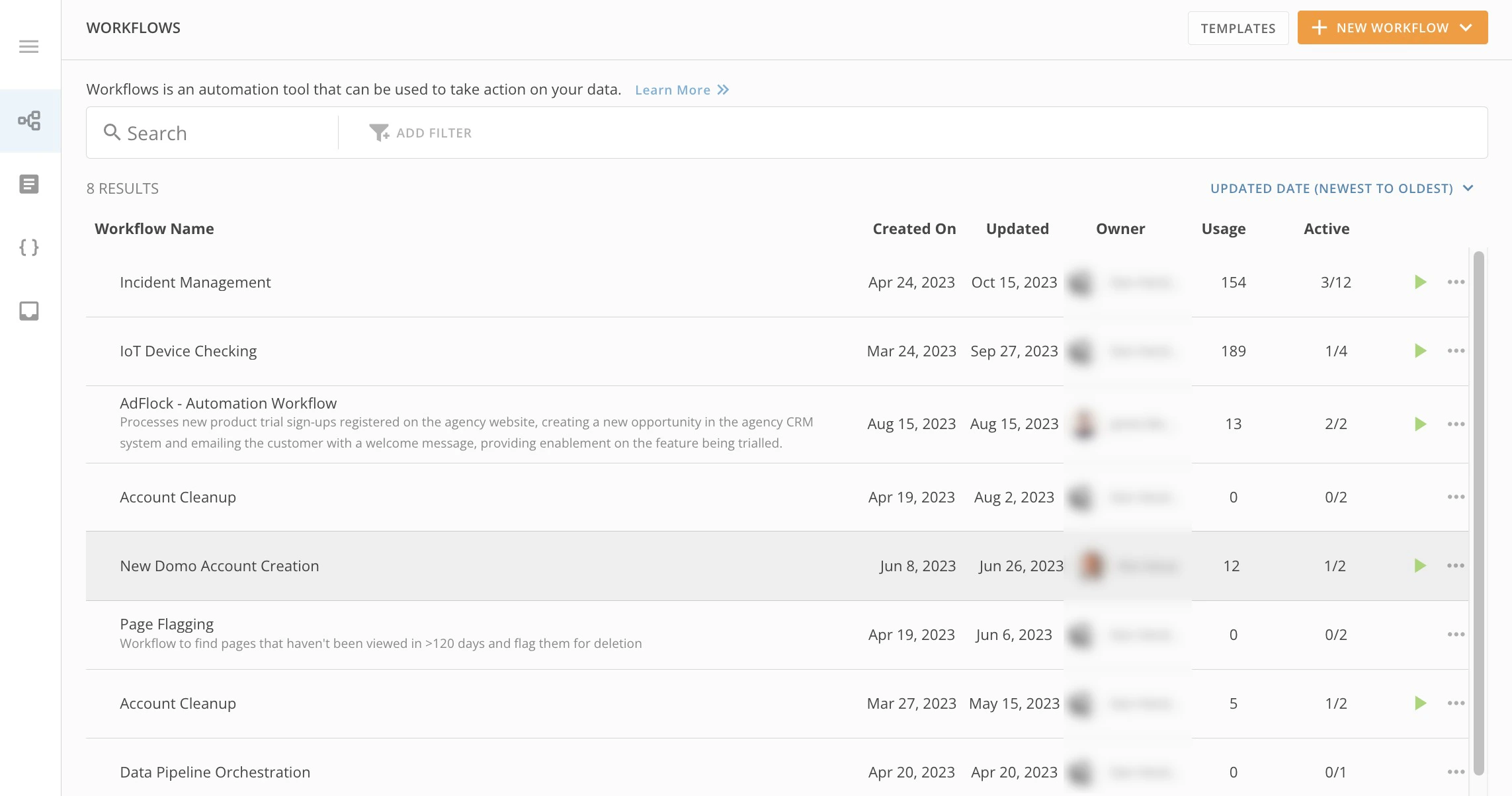
To access the AI Service Layer (both standard and advanced options) after they have been enabled in your instance, follow these steps:- In the navigation header, select More > Workflows to display the Workflows landing page.
- Either select an existing workflow or select + New Workflow.
- In this article, go to either the instructions for Standard AI Service Layer integration or Advanced AI Service Layer integration and follow the steps.
Standard AI Service Layer Integration
After opening your new or existing workflow, follow these steps to add a standard AI Service Layer function:- (Conditional) For a new workflow, first choose a Start type.
- Select Add > Service Task.
-
In the configuration panel at the right of the canvas, under the Mapping tab, select Explore Functions. to display the available packages.
The Packagesmodal displays.

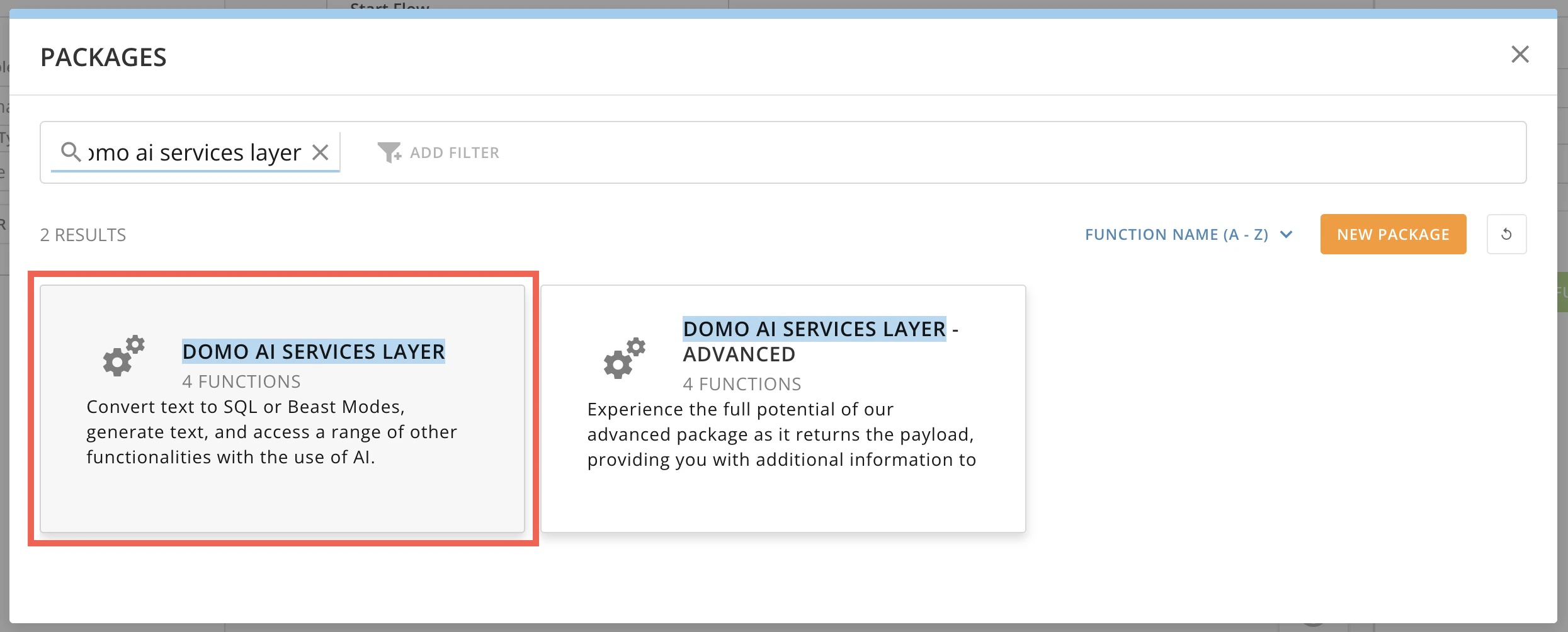
- In the modal, use the search bar to enter and locate the Domo AI Services Layerpackage.
-
In the search bar, locate the Domo AI Services Layer option.
-
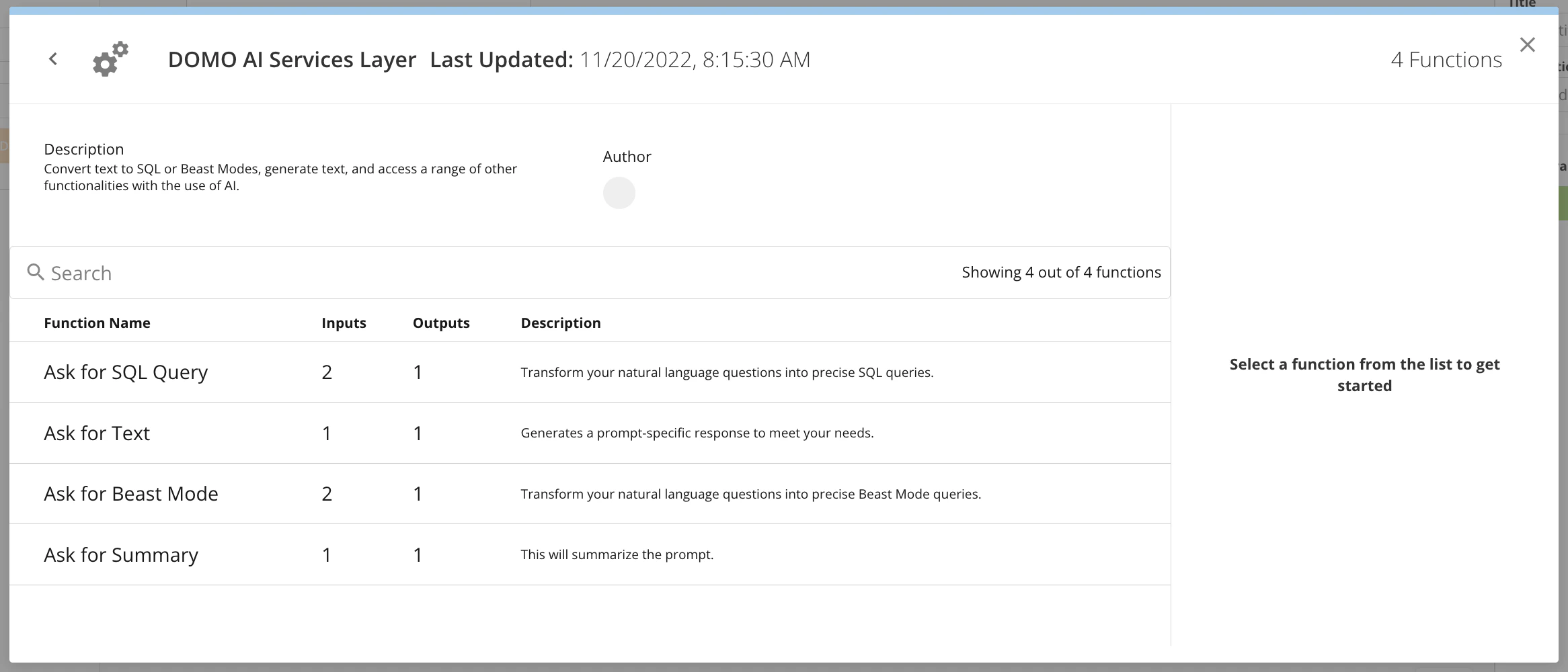
Select Domo AI Services Layer to view the available functions. Choose which one to add to your flow.
- Ask for SQL Query
- Ask for Text
- Ask for Beast Mode
-
Ask for Summary
Ask for SQL Query
The Ask for SQL Query function allows you to transform your natural language questions into precise SQL queries. As with the AI Playground Text-to-SQL feature, you can input and map parameters for your output SQL query and test the input and output.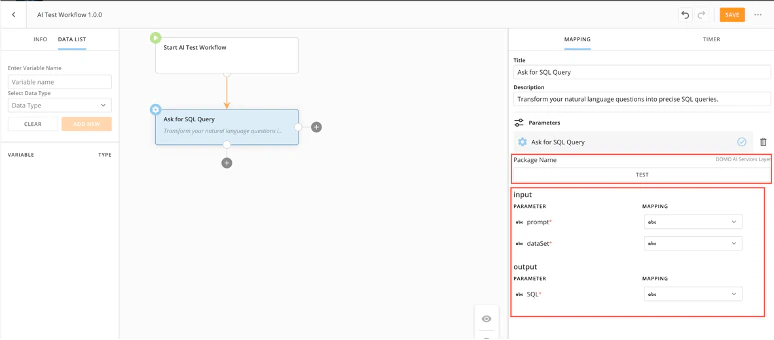
Ask for Text
The Ask for Text function allows you to generate a prompt-specific response to meet your needs. You can input and map parameters for your output text query and test the input and output.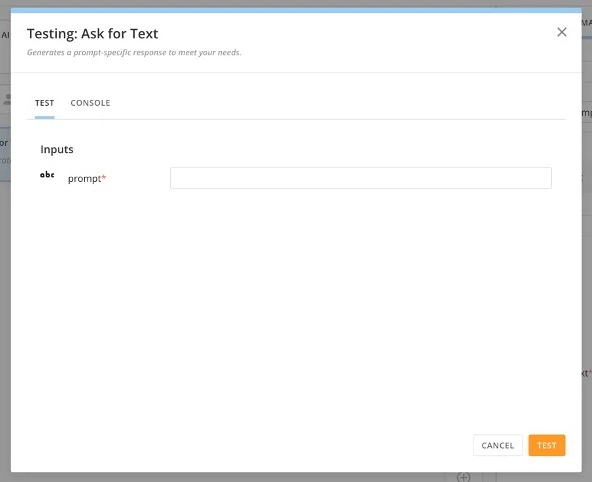
Ask for Beast Mode
The Ask for Beast Mode function allows you to transform your natural language questions into precise Beast Mode queries. You can input and map parameters for your output Beast Mode query and test the input and output.
Ask for Summary
The Ask for Summary function allows you to summarize a prompt. You can input and map parameters for your output summary query and test the input and output.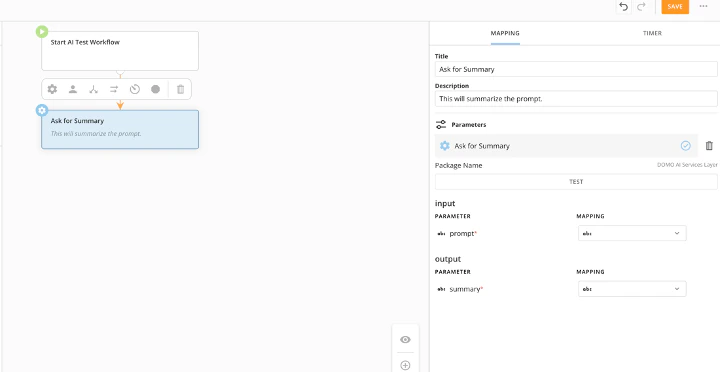
Advanced AI Service Layer Integration
After opening your new or existing workflow, follow these steps to add an advanced AI Service Layer function:- Add a new action and select Explore Functions.
- In the search bar, locate the Domo AI Services Layer – Advanced option.
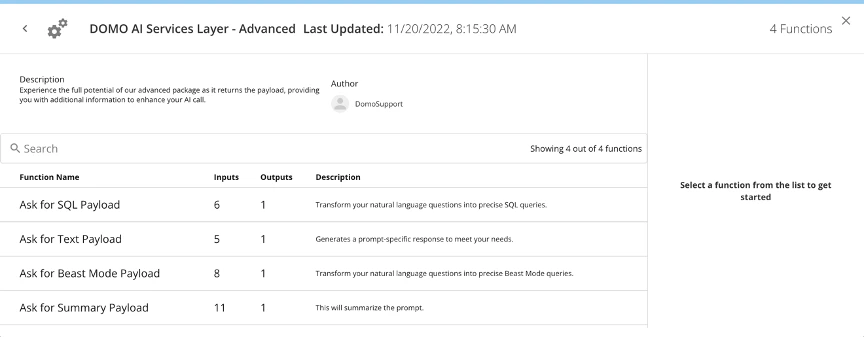
- Select Domo AI Services Layer – Advanced to view the available functions and choose which one to add:
- Ask for SQL payload
- Ask for text payload
- Ask for Beast Mode payload
- Ask for summary payload
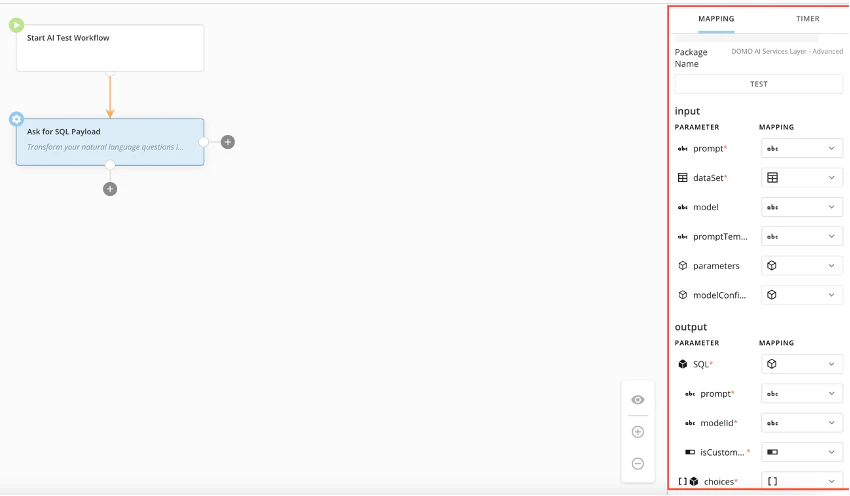
Ask for SQL Payload
The Ask for SQL Payload function transforms your natural language questions into precise SQL queries, returns the payload, and allows for more input and output options. You can define the following input parameters:- dataset
- input prompt
- model
- modelConfiguration
- parameters
- promptTemplate
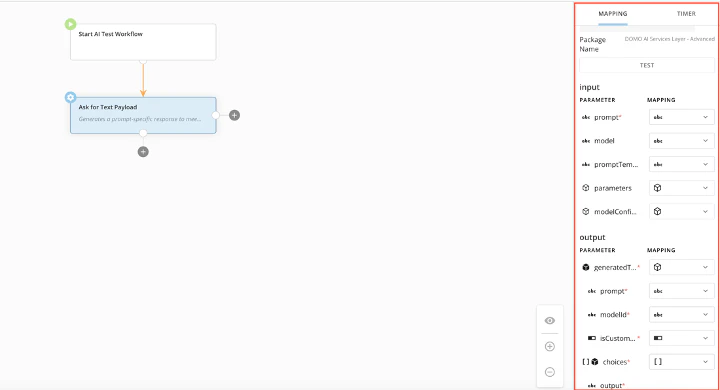
Ask for Text Payload
The Ask for Text Payload function generates a prompt-specific response to meet your needs, returns the payload, and allows for increased input and output options. This function allows you to set up mapping for the following:- input prompt
- model
- modelConfiguration
- parameters
- promptTemplate
- generatedText
- isCustomerModel
- modelId
- prompt
Ask for Beast Mode Payload
The Ask for Beast Mode Payload function transforms your natural language questions into precise Beast Mode calculations, returns the payload, and allows for increased input and output options. This function allows you to map the following parameters:- chatContext
- dataSet
- input prompt
- modelConfiguration
- parameters
- promptTemplate
- system
- beastMode
- isCustomerModel
- modelId
- prompt
- choices

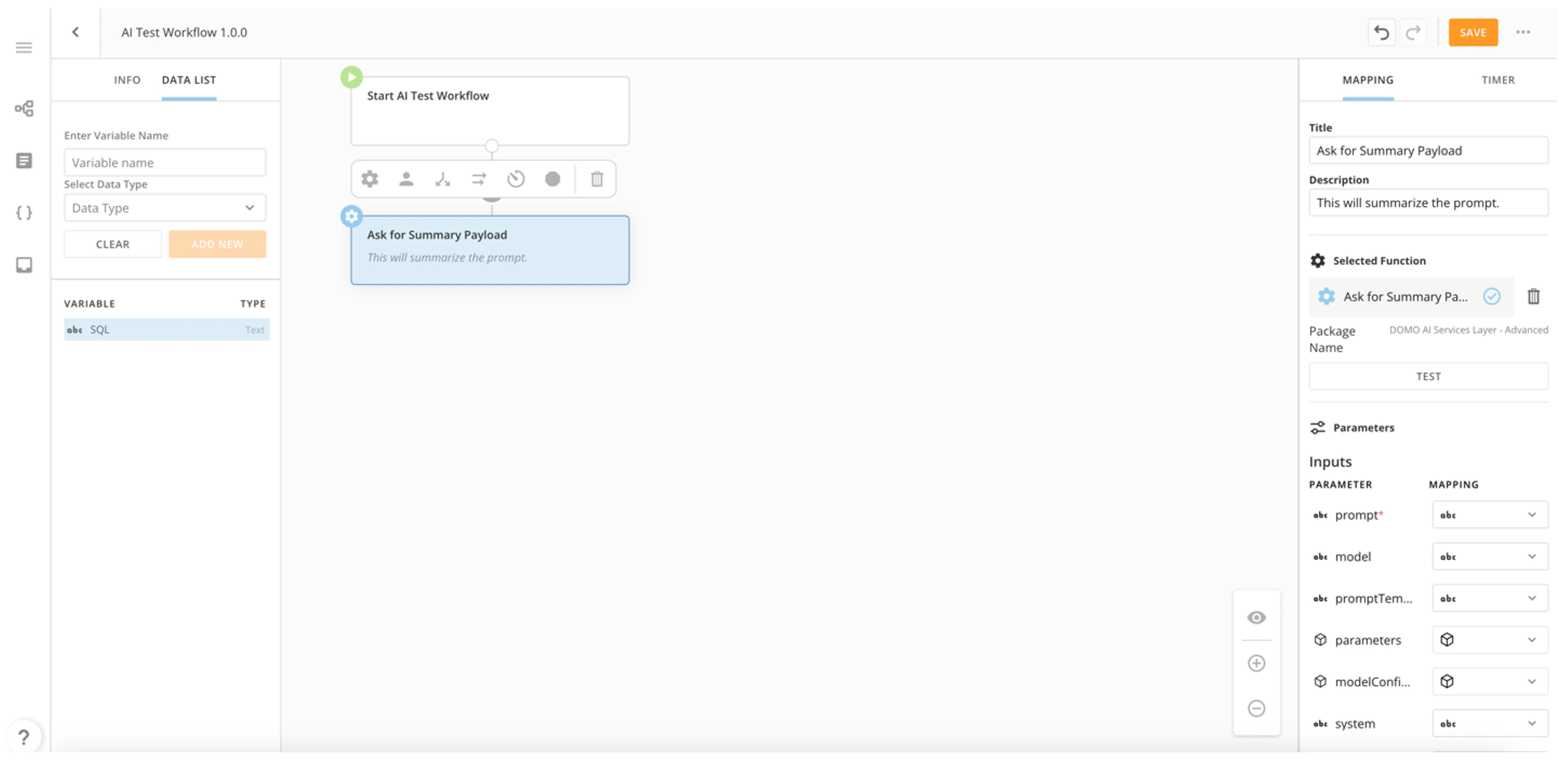
Ask for Summary Payload
The Ask for Summary Payload function summarizes a prompt and returns the payload. This function allows you to map the following input parameters. Required parameters are starred (*).- chatContext
- chunkingConfiguration
- model
- modelConfiguration
- parameters
- prompt*
- promptTemplate
- sizeBoundary
- summarizationOutputStyle
- summarizationStrategy
- system
- choices
- isCustomerModel
- modelId
- prompt
- summary
Input Parameter Reference
| Parameter | Data type | Definition | |||||||||||||||||||||
|---|---|---|---|---|---|---|---|---|---|---|---|---|---|---|---|---|---|---|---|---|---|---|---|
| chatContext | A list of historical messages between the AI and the user to be considered in the current request. | ||||||||||||||||||||||
| chunkingConfiguration | With large documents, not all text can be included in every request because the document may be too long to fit in the context window. The chunking configuration helps guide how we split our document into smaller parts or chunks. | --- | --- | chunkOverlap | Text can be overlapped to help give context to how the chunks in a document are grouped. An integer value defines the size of the overlap between successive chunks. | disallowIntermediateChunks | Sometimes when trying to summarize very long texts, chunks are summarized and put together only to find that the text is still too long. In these cases, you would get summaries of the summaries unless disallowIntermediateChunks is set to false. | maxChunkSize | An integer value that specifies the maximum size for a chunk | separators | A list of String values that is used to separate chunks in order of most to least desired. For example: [“\n\n”, “\n”, ”.”, ""] separates double new lines first (within the max chunk size) followed by a single new line, then a period, followed by any character. | separatorType | Out of the box separator types. The default is Text and includes HTML, JavaScript, Python. | ||||||||||
| dataSet | The ID for the DataSet used in the request. | ||||||||||||||||||||||
| generatedText | The object that contains the pompt, | ||||||||||||||||||||||
| isCustomerModel | |||||||||||||||||||||||
| model | text | The AI you want to send your request to. Examples: GPT-4, Claude-2.1 | |||||||||||||||||||||
| modelConfiguration | A map with custom configuration parameters for a selected language model. | ||||||||||||||||||||||
| modelId | |||||||||||||||||||||||
| sizeBoundary | The desired length of the output text represented as a boundary between min and max length. | ||||||||||||||||||||||
| parameters | The variables that can be inserted into the promptTemplate. | ||||||||||||||||||||||
| prompt | text | The field for any instructions needed to run the function. | |||||||||||||||||||||
| promptTemplate | text | A text template that supports placeholder variables allowing users to easily organize input to the Large Language Model. Example: Summarize the following text to be no longer than ${max_word_count} words: ${input} | |||||||||||||||||||||
| SQL | This is the output of the request in SQL. | ||||||||||||||||||||||
| summarizationOutputStyle | Bulleted, numbered, or paragraph | ||||||||||||||||||||||
| summarizationStrategy | The strategy to follow while summarizing the given input. Currently available strategies include STUFFING or MAP_REDUCE. | ||||||||||||||||||||||
| system | Allows you to set a system prompt for the model. |
Output Parameters
Required parameters have an *.| Parameter | Definition | |||||||||||||||||||||
|---|---|---|---|---|---|---|---|---|---|---|---|---|---|---|---|---|---|---|---|---|---|---|
| beastMode | The output object of the Ask for Beast Mode Payload service. It contains the following parameters: - isCustomerModel - modelId - prompt | |||||||||||||||||||||
| chatContext | A list of historical messages between the AI and the user to be considered in the current request. | |||||||||||||||||||||
| choices | A list of the outputs that the service creates. | |||||||||||||||||||||
| chunkingConfiguration | With large documents, not all text can be included in every request because the document may be too long to fit in the context window. The chunking configuration helps guide how we split our document into smaller parts or chunks. | --- | --- | chunkOverlap | Text can be overlapped to help give context to how the chunks in a document are grouped. An integer value defines the size of the overlap between successive chunks. | disallowIntermediateChunks | Sometimes when trying to summarize very long texts, chunks are summarized and put together only to find that the text is still too long. In these cases, you would get summaries of the summaries unless disallowIntermediateChunks is set to false. | maxChunkSize | An integer value that specifies the maximum size for a chunk | separators | A list of String values that is used to separate chunks in order of most to least desired. For example: [“\n\n”, “\n”, ”.”, ""] separates double new lines first (within the max chunk size) followed by a single new line, then a period, followed by any character. | separatorType | Out of the box separator types. The default is Text and includes HTML, JavaScript, Python. | |||||||||
| dataSet | The ID for the DataSet used in the request. | |||||||||||||||||||||
| generatedText | ||||||||||||||||||||||
| isCustomerModel | ||||||||||||||||||||||
| model | The AI you want to send your request to. Examples: GPT-4, Claude-2.1 | |||||||||||||||||||||
| modelConfiguration | A map with custom configuration parameters for a selected language model. | |||||||||||||||||||||
| modelId | ||||||||||||||||||||||
| outputWordLength — Size Boundary | The desired length of the output text represented as a boundary between min and max length. | |||||||||||||||||||||
| parameters | ||||||||||||||||||||||
| prompt | The field for the user to input any instructions that should be included in the prompt needed to run the function. | |||||||||||||||||||||
| promptTemplate | A text template that supports placeholder variables allowing users to easily organize input to the Large Language Model. Example: Summarize the following text to be no longer than ${max_word_count} words: ${input} | |||||||||||||||||||||
| SQL | This is the output of the request in SQL. | |||||||||||||||||||||
| summarizationOutputStyle | Bulleted, numbered, or paragraph | |||||||||||||||||||||
| summarizationStrategy | The strategy to follow while summarizing the given input. Currently available strategies include STUFFING or MAP_REDUCE. | |||||||||||||||||||||
| summary | The output of the function. | |||||||||||||||||||||
| system |